





Truckers know there’s no such thing as a free ride. Every mile costs fuel, maintenance and time.
The same rule applies to the apps you use on the road. If you’re not paying for an app, chances are they’re making money off your personal data.
Consider this: When you search for new tires or a dashcam, ads for those products soon follow you on Facebook or Instagram. Navigation apps, load boards and even music streaming services track where you are and what you do. That information gets sold to advertisers who target you with promotions, whether you’re at a truck stop, resting at home or hauling freight across the country.
Let’s take a look at the 20 most invasive apps, how they use your data, and what you can do to protect yourself while staying connected on the road.
Sign up for Kurt’s FREE CyberGuy Report: Get Kurt’s best tech tips, urgent security alerts and exclusive deals delivered straight to your inbox. Plus, you’ll get instant access to the Ultimate Scam Survival Guide — free when you join.
The most invasive apps you’re probably using
Apps collect all sorts of data about you, but let’s get one thing straight: Not all data collection is bad. Some apps genuinely need access to certain information to function properly. For example, Uber stores your location data to help you find a ride faster, while WhatsApp requires access to your contacts so you can send messages.
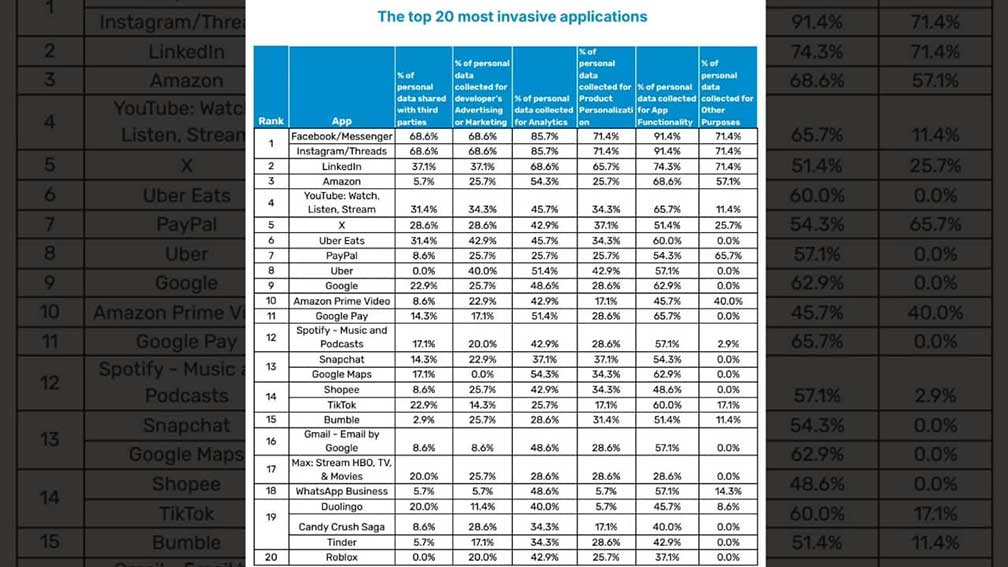
The real issue is data collection that serves no purpose other than showing you ads or selling your information to third parties. According to Marin Marinčić, head of IT Infrastructure at Nsoft, the top 20 most invasive apps collect data that is not necessary for their core functions.
Leading the list is Meta with all four of its major apps. Facebook, Messenger, Instagram and Threads share 68% of collected data with third parties while also using it for targeted ads. LinkedIn follows, sharing around 37% of user data, with Amazon in third place, followed by YouTube.
What makes this concerning is how deeply embedded these apps are in our daily lives, making it nearly impossible to find alternatives or avoid data collection altogether.
The list also includes Elon Musk’s X at No. 5, followed by Uber Eats, PayPal, Uber, Google and Amazon Prime Video. TikTok, despite ongoing scrutiny over its data policies, ranks 14th. While many of these names were expected, one surprising entry is the mobile game Candy Crush, which uses 28% of collected data for ads. You can find the full list in the image below.
Looking for alternatives is the only solution
Avoiding data collection is nearly impossible if you use the apps above. The only way to dodge these invasive apps is to switch to apps that respect your privacy. While it may seem impossible to replace some of the biggest platforms, there are alternatives that collect little to no unnecessary data.
- For messaging, Signal is one of the best options. Unlike WhatsApp, it does not store metadata or share information with third parties. If you need a search engine that does not track your activity, check out these options instead of Google.
- When it comes to social media, Mastodon and Bluesky offer decentralized alternatives to Twitter.
- For those looking to replace YouTube, PeerTube and Nebula are worth exploring.
- If you shop frequently on Amazon, consider smaller online retailers or direct brand websites that may be less likely to track your every move.
- Instead of Google Drive, consider these solutions, which offer cloud storage with strong encryption.
Switching to these alternatives may require some effort, but it is the best way to limit how much of your personal data is being collected. Taking control of your privacy starts with making conscious choices about the apps you use.
6 ways to reduce data sharing
If you’re not able to delete the apps listed above, follow the simple steps below to minimize how much information is being collected and shared.
1. Review app permissions: Most apps request access to data they do not actually need. Go to your phone settings and check app permissions on your iPhone and Android. Disable access to location, microphone, contacts, and other sensitive data unless absolutely necessary.
2. Turn off ad personalization: Many companies track your online activity to show targeted ads. You can limit this by disabling ad personalization in Google, Facebook and other accounts. This reduces the amount of data collected about your interests and behavior.
3. Limit social media tracking: Social media platforms track your activity even when you are not using them. Adjust privacy settings to restrict data collection.
4) Avoid signing in with Google or Facebook: Many websites offer login options using Google or Facebook. While convenient, this shares even more data with these platforms. Instead, create separate accounts using email whenever possible.
5. Use a Virtual Private Network (VPN) and private browsing mode: A VPN hides your IP address, helping to obscure your location and online activity, making it harder for websites to track you. Combined with private browsing or incognito mode, this reduces the amount of data companies can collect about your online activity. Using a VPN (Virtual Private Network) service can also enhance your privacy by encrypting your internet traffic, making it harder for hackers and third parties to intercept your data, especially on public Wi-Fi. While VPNs don’t directly prevent phishing emails, they reduce the exposure of your browsing habits to trackers that may use this data maliciously. With a VPN, you can securely access your email accounts from anywhere, even in areas with restrictive internet policies.
For the best VPN software, see Kurt’s expert review of the best VPNs for browsing the web privately on your Windows, Mac, Android and iOS devices at Cyberguy.com/VPN
6. Regular app clean-up: Uninstall apps you no longer use to reduce passive data collection.
App-specific suggestions to safeguard your digital footprint
Protect your personal information across the popular platforms mentioned above with these essential privacy adjustments.
Facebook/Instagram/Threads:
- Disable activity tracking by going to Settings > Privacy > Activity Tracking.
- Turn off “Apps, Websites, and Games” to limit third-party data sharing.
LinkedIn:
- Turn off ad targeting in Settings > Advertising preferences.
- Disable profile viewing history.
Amazon/Prime Video:
- Opt-out of personalized ads in your account settings.
- Limit sharing by disabling Alexa voice data storage (if applicable).
YouTube/Google Products (e.g., Gmail, Google Maps):
- Disable ad personalization under Google Account > Data & Personalization > Ad Settings.
- Turn off location history and web/app activity tracking.
Uber/Uber Eats:
- Use the app only when needed, and avoid storing payment methods if possible.
- Disable tracking after rides/deliveries are complete.
PayPal:
- Restrict sharing under Settings > Privacy & Security by opting out of data sharing for marketing purposes.
Snapchat:
- Disable location sharing via Snap Map and turn off ad personalization under Ad Preferences.
TikTok:
- Restrict personalized content recommendations in Privacy > Personalization and Data.
- Avoid posting unnecessary personal information.
Spotify:
- Adjust data sharing preferences in Account Settings > Privacy Settings.
- Opt out of tailored ads.
Roblox:
- Set strict privacy controls in the account settings, especially for children.
- Use a separate, disposable email for account registration.
Kurt’s key takeaway
Just like you wouldn’t leave your rig unlocked at a rest stop, you shouldn’t leave your personal data wide open for apps to grab. Every tap, search, or download can leave a trail that companies use to profit off you.
The good news is you don’t have to give up the tools you rely on. By cutting back permissions, cleaning up unused apps, and choosing privacy-friendly alternatives, you can stay connected without giving away more than you want.
At the end of the day, protecting your data is a lot like maintaining your truck. A little routine care goes a long way in keeping you safe, secure, and in control of the road ahead.
Do you check app permissions before installing? How do you decide which permissions are acceptable? Let us know by writing to us at Cyberguy.com/Contact.
For more of Kurt’s tech tips & security alerts, subscribe to the free CyberGuy Report Newsletter.
Copyright 2025 CyberGuy.com. All rights reserved.
Kurt the CyberGuy is an award-winning tech journalist who helps people make smart tech decisions from his contributions to Fox News & FOX Business, beginning mornings on “FOX & Friends.”
Ask Kurt a question or let us know what stories you’d like us to cover.
Follow Kurt on his social channels:
Facebook • YouTube • Instagram • TikTok

Kurt Knutsson — best known as “Kurt the CyberGuy” — has a deep love of technology that makes life better. Because of this, along with a passion for helping others, he created the largest syndicated tech lifestyle franchise on television. As a trusted source, Kurt’s unique insider access to major tech launches and industry visionaries has helped earn him two Emmy Awards and a Golden Mic.
Kurt lives between his home in California and New York City, where he is also the chief tech contributor on Fox News & Fox Business networks beginning his mornings on Fox & Friends.
Kurt’s a curious guy. Like many entrepreneurs in life, he wears several hats like running a private investment fund, giving inspirational talks, mentoring start-ups and traveling the world chasing down the next breakthrough.